
This article was updated in May 11, 2026 with new products and information by Mark S. Taylor
Your parking brake is off — you’re sure of it — but that red light is still glowing on the dash. Frustrating, right? The good news: most parking brake light issues come down to a handful of easy-to-fix causes. This guide walks you through every one of them, with model-specific reset steps for Nissan, Toyota, Audi, and Mitsubishi. Let’s get it sorted.
Contents
- 1 What Is the Parking Brake Light?
- 2 Why Is the Parking Brake Light Still On?
- 3 How to Reset the Parking Brake Light — Step by Step
- 4 Model-Specific Reset Steps
- 5 Parking Brake Light vs. ABS Light — What If Both Are On?
- 6 When to See a Mechanic
- 7 Common Mistakes to Avoid
- 8 FAQs About How to Reset the Parking Brake Light
- 8.1 Q: Why is my parking brake light on when the brake is off?
- 8.2 Q: How do I reset the parking brake light on a Nissan?
- 8.3 Q: Can I drive with the parking brake light on?
- 8.4 Q: What does a flashing parking brake light mean?
- 8.5 Q: Why are both my ABS light and parking brake light on?
- 8.6 Quick Summary
Quick Answer
To reset parking brake light: release the parking brake fully, check brake fluid levels, and inspect the brake switch or sensor. If the light stays on, use an OBD2 scanner to clear the fault code. For electronic parking brakes, follow your vehicle’s model-specific reset procedure. If the light returns, have the brakes inspected by a mechanic.
What Is the Parking Brake Light?
The parking brake warning light is a red indicator on your dashboard — usually a circle with an exclamation mark or the letter ‘P’. It lights up when the parking brake is engaged, but it can also stay on to warn you about problems with your braking system.
Ignoring it isn’t safe. Your brakes are your car’s most critical safety system. When the light stays on after releasing the brake, your car is telling you something needs attention.
Why Is the Parking Brake Light Still On?
There are several reasons the light may refuse to turn off — even when the brake itself is released.
| Cause | What It Means | Urgency |
| Low brake fluid | Fluid dropped below MIN level — sensor triggers warning as a safety alert. | Fix promptly |
| Worn brake pads | Pad wear sensors detect thin pads and alert the driver via dashboard warning. | Fix within days |
| Faulty brake switch | Worn or dirty switch misreads the brake position and keeps the light on. | Fix soon |
| Stretched brake cable | Cable loosens over time, fails to fully release the brake — confuses sensor. | Inspect now |
| ABS / sensor fault | Wheel speed sensor or ABS module issues can trigger the brake warning light. | Scan immediately |
| Master cylinder issue | Failing cylinder causes fluid loss and pressure drops — multiple dash warnings. | Stop driving |

How to Reset the Parking Brake Light — Step by Step
Work through these steps in order. Most problems are resolved by step 3 or 4.
Step 1 Check the parking brake is fully released — Pull the lever all the way up and push it firmly down. For foot pedals, press down and release fully. Even slight tension on the cable can keep the sensor triggered. If the lever feels stiffer or looser than normal, the cable may need adjusting.
Step 2 Check the brake fluid level — Pop the hood and locate the brake fluid reservoir — a small translucent tank near the firewall with MIN and MAX markings. If below MIN, top it up with the correct fluid type listed in your owner’s manual (usually DOT 3 or DOT 4). If the level drops again within days, you likely have a leak.
Warning: Never use the wrong brake fluid type. Mixing incompatible fluids can damage seals and compromise your entire braking system.
Step 3 Inspect the brake switch or sensor — A small switch near the parking brake lever or pedal detects whether the brake is on or off. If worn, dirty, or stuck, it misreads position and keeps the light on. Press it gently — if it feels loose or doesn’t click cleanly, it likely needs replacing. Usually inexpensive at a mechanic.
Step 4 Use an OBD2 scanner to clear fault codes — An OBD2 scanner plugs into your car’s data port (usually under the dashboard, driver’s side). It reads stored fault codes and lets you clear them once the underlying issue is fixed. Available for $20–$50 at any auto parts store.
Pro Tip: Clear the code only after fixing the root cause. Clearing without fixing means the light will return — usually within a few miles of driving.
Step 5 Adjust or replace the brake cable — If the cable has stretched, it may not pull the brake shoes fully off even when the lever is released. Check for visible slack under the vehicle. If the cable looks frayed or corroded, replace it — don’t delay on this one.
Model-Specific Reset Steps
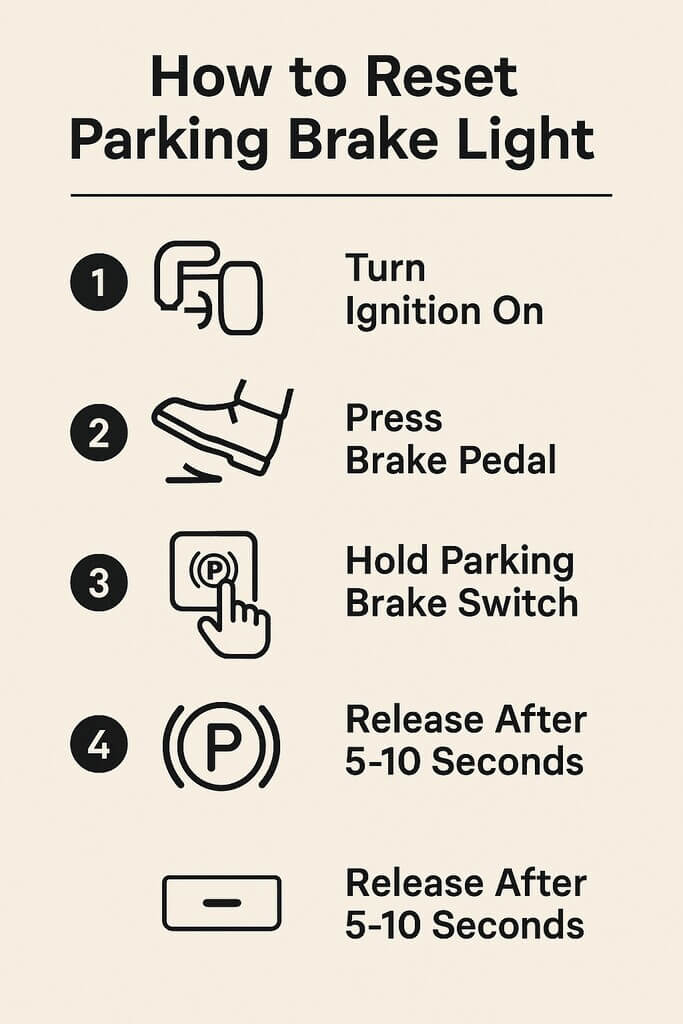
Electronic parking brakes require specific reset sequences. Follow the steps below for your vehicle brand.
Mitsubishi Outlander
- Ensure the vehicle is parked on a flat surface with the engine off.
- Press and hold the brake pedal firmly.
- Turn the ignition to the ‘on’ position (do not start the engine).
- Press and hold the parking brake button for approximately 10 seconds.
- Release the button — the light should turn off.
Pro Tip: If the light doesn’t clear, check brake fluid level first and try again. Some model years require a specific reset tool.
Nissan (Altima, Rogue, and similar)
- Park on a flat surface. Ignition off.
- Press and hold the brake pedal.
- Turn the ignition to ‘on’ (do not start).
- Press and hold the electronic parking brake button for 5–10 seconds.
- The system runs a self-check and releases the light if no fault is found.
Pro Tip: For Nissan models with an electronic park brake, the system performs an auto-calibration during this sequence. Keep the brake pedal depressed throughout.
Toyota (Camry, RAV4, and similar)
- Park on level ground. Engine off.
- Press and hold the brake pedal.
- Turn the key or push the start button to ‘on’ — do not start the engine.
- Press and hold the parking brake button for 3–5 seconds until the light blinks and goes off.
- If the light remains, consult your vehicle’s service manual for your specific model year.
Warning: Do not attempt this while the engine is running on Toyota hybrid models. The sequence differs — refer to your owner’s manual.
Audi (A3, A4, Q5, and similar)
- Sit in the driver’s seat with the door closed.
- Press and hold the brake pedal firmly.
- Turn the ignition to ‘on’ (do not start).
- Press and hold the electronic parking brake button for 10 seconds.
- If the light persists, an Audi-specific OBD2 tool (such as VCDS) may be required.
Pro Tip: Audi’s electronic parking brake is more sensitive than most. If basic steps fail, a dealer-level diagnostic tool is usually needed. Independent Audi specialists often charge less than a main dealer.
Pro Tip: Audi’s electronic parking brake is more sensitive than most. If basic steps fail, a dealer-level diagnostic tool is usually needed. Independent Audi specialists often charge less than a main dealer.
Parking Brake Light vs. ABS Light — What If Both Are On?
Seeing both lights at the same time is a more serious signal. It usually means your car suspects a problem with both the braking system and the anti-lock system simultaneously.
Common causes include a faulty ABS wheel speed sensor, corroded wiring, low brake fluid affecting both systems, or an ABS module fault. Plug in an OBD2 scanner to read the specific fault codes. If codes point to an ABS module issue, see a mechanic. Do not clear and ignore.
When to See a Mechanic
- The light returns within a day or two of resetting
- Your brake pedal feels soft, spongy, or sinks to the floor
- Both the ABS light and brake light are on simultaneously
- You notice brake fluid level dropping repeatedly
- The car pulls to one side when braking
- You hear grinding or squealing when applying the brakes
Warning: Any soft brake pedal is an emergency. Do not drive the vehicle until a mechanic has inspected the braking system. This is a critical safety issue.
Common Mistakes to Avoid
Mistake: Clearing the fault code without fixing the root cause. The light will return and the problem will worsen.
Mistake: Topping up brake fluid without finding out why it was low. Low fluid usually means worn pads or a leak.
Mistake: Ignoring a flashing brake warning light. A flashing light signals an active, urgent fault — not a minor alert.
Mistake: Using the wrong brake fluid type. Always check your owner’s manual. DOT 3 and DOT 4 are not always interchangeable.
FAQs About How to Reset the Parking Brake Light
Q: Why is my parking brake light on when the brake is off?
A: The most common causes are low brake fluid, a faulty brake switch, or a stretched parking brake cable that isn’t fully releasing. Check the fluid level first — it’s the quickest thing to confirm.
Q: How do I reset the parking brake light on a Nissan?
A: Press the brake pedal, turn the ignition to ‘on’ (don’t start the engine), then press and hold the electronic parking brake button for 5–10 seconds. The system runs a self-check and clears the light if no fault is detected.
Q: Can I drive with the parking brake light on?
A: If the brake is fully released and fluid is topped up, driving short distances while getting it checked is generally acceptable. However, if the brake pedal feels soft or spongy, stop driving immediately — that indicates a serious fault.
Q: What does a flashing parking brake light mean?
A: A flashing light signals an active, urgent fault — not just a minor alert. It often points to dangerously low brake fluid, a brake system pressure loss, or an ABS fault. Have the system scanned with an OBD2 tool as soon as possible.
Q: Why are both my ABS light and parking brake light on?
A: Both lights on simultaneously usually means a shared fault — low brake fluid affecting both systems, a faulty ABS wheel speed sensor, or corroded wiring. Plug in an OBD2 scanner to read the specific fault codes before attempting repair.
Quick Summary
- Release the brake fully — check for cable slack or stiffness
- Check brake fluid — top up if below MIN mark
- Inspect brake switch — replace if worn or dirty
- Use OBD2 scanner to read and clear fault codes
- Follow model-specific steps for electronic parking brakes
- Both ABS + brake lights on = scan immediately, don’t ignore
- Soft pedal = stop driving, call a mechanic right away